



In today’s fast-moving sales environment, teams are expected to respond quickly, personalise every touchpoint, and manage an increasing volume of leads, all without sacrificing quality. Naturally, that level of demand makes manual processes harder to sustain.
This is where AI for sales and AI sales automation becomes especially valuable. Rather than replacing your team, it helps remove unnecessary friction, streamline routine tasks, and give sales professionals the time and clarity they need to focus on meaningful work.Below, we explore eight practical AI sales automation workflows that are both achievable and highly effective. Each one includes a simple example to show how it works in real-world sales operations.
1. Intelligent Lead Scoring Based on Behaviour
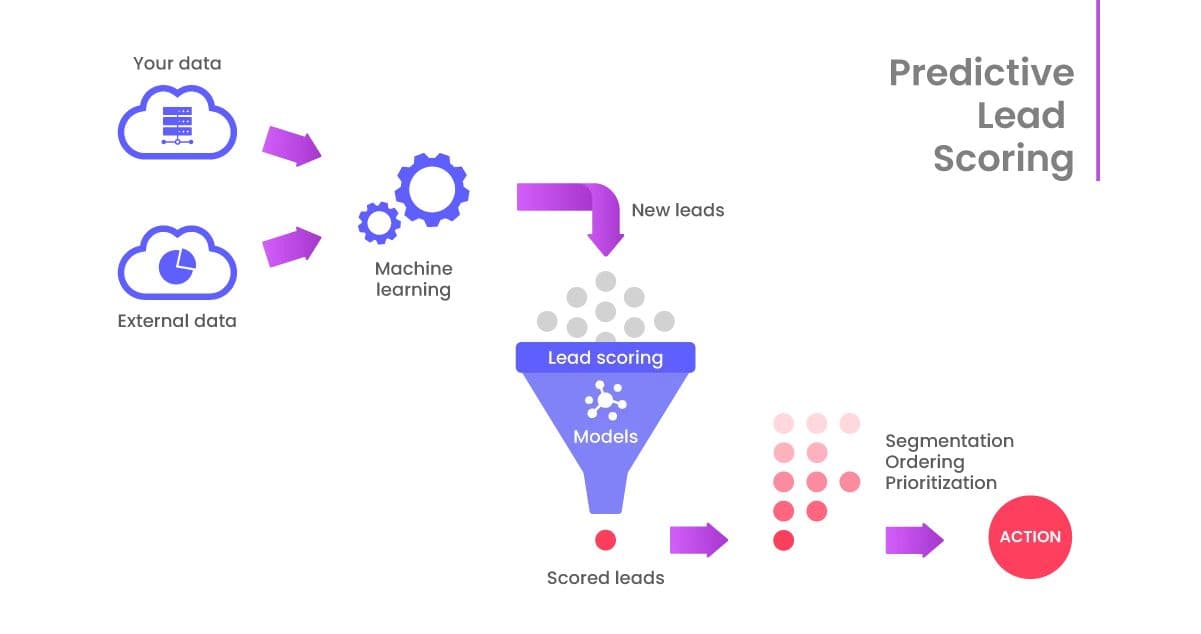
Traditional lead scoring tends to rely on static data such as job titles or company size. However, AI can add far more depth by analysing real-time behaviours, including page visits, email interactions, content downloads, or even broader market intent signals.
What This Workflow Typically Analyses
- Website activity (time on page, key page visits, return frequency)
- Engagement with email and content assets
- Interaction patterns compared to past customers
- Social listening and intent data
- CRM historical behaviour trends
Example
If a prospect repeatedly views a product page, downloads a technical resource, and engages with comparison content, AI identifies this as high buying intent and automatically elevates the lead score.
Why It Matters
As a result, your team spends more time with leads who are ready to talk, rather than sorting through a long list of names.
How to Implement This Workflow
1. Map your high-intent behaviours
Start by identifying the specific behaviours that normally signal a strong buying interest. This could include repeat visits to your pricing page, downloading technical documents, or attending webinars. These actions will act as signals for your AI scoring model.
2. Choose an AI scoring tool
Select a platform capable of dynamic lead scoring such as Salesforce Einstein, HubSpot’s AI features, or a custom scoring model. The tool should integrate easily with your existing CRM system.
3. Feed historical CRM data into the model
To ensure accuracy, import at least several months of closed-won and closed-lost deals. The AI will study these patterns to understand what distinguishes high-value leads from casual browsers.
4. Set thresholds for lead tiers
Create categories based on score ranges, such as “Sales-ready”, “Nurture”, or “Long-term”. This helps your team prioritise follow-up more efficiently.
5. Integrate scoring into your CRM
Once configured, ensure that each new behaviour automatically adjusts the lead’s score. This keeps the system responsive to real-time engagement.
6. Review and refine regularly
Lead scoring is not static. Review score accuracy each week, compare AI predictions with actual outcomes, and adjust weighting where necessary.
2. Automated Personalised Outreach Sequences
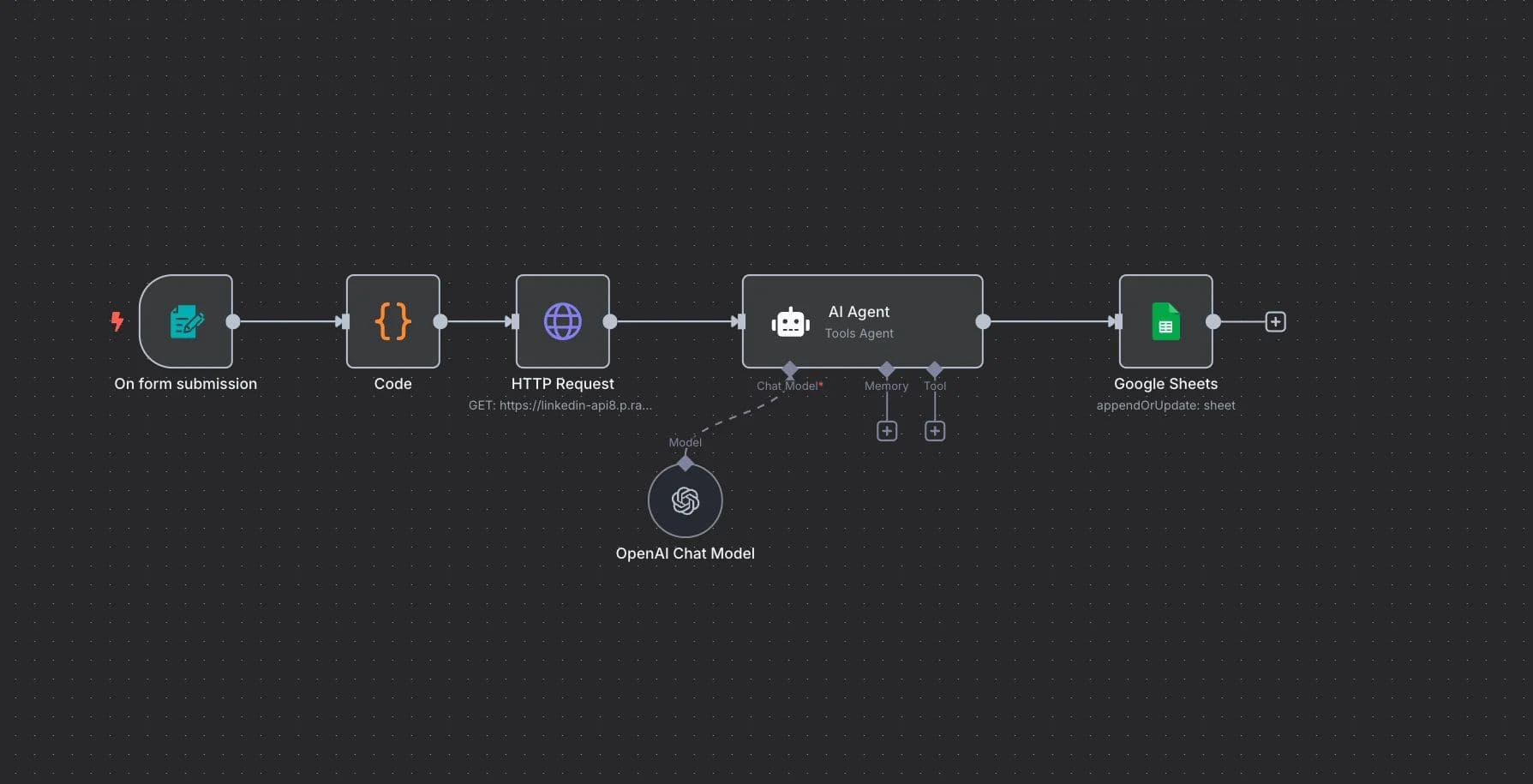
Once you understand who your high-intent leads are, the next challenge is engaging them with meaningful communication. AI can help by creating personalised outreach sequences tailored to industry, interests, or recent activity.
How this workflow usually functions
- A trigger event occurs (e.g., a download, a form submission, or a product view).
- AI generates tailored messaging using the prospect’s data.
- Follow-up emails adjust automatically depending on whether the person opens, clicks, or ignores them.
- Messaging evolves over time, not just repeating the same template.
Example
If a prospect downloads a pricing guide, an AI-driven workflow can initiate a follow-up email that references the exact document, offers helpful context, and provides related resources.
Benefit
This creates a more natural conversation flow and helps prospects feel genuinely understood.
How to Implement This Workflow
1. Identify important trigger events
Choose the interaction points that should activate automated communication, such as a new sign-up, ebook download, or product comparison view. Trigger events allow AI to respond instantly and contextually.
2. Prepare a content library
Gather your most commonly used resources: case studies, product descriptions, FAQs, and value propositions. The AI draws from this library to personalise messaging.
3. Use an AI-enabled email system
Select a platform like Outreach, Apollo, or HubSpot. These tools use AI to generate and schedule personalised sequences based on lead behaviour.
4. Define variables for personalisation
Decide which elements should dynamically change, such as industry, job role, company size, or mentioned challenges. This keeps emails relevant to each recipient.
5. Set behavioural conditions
Ensure the workflow adapts based on email engagement. For example, send additional context if the lead clicks a link, or a gentle reminder if the email remains unopened.
6. Monitor and refine performance
Examine open rates, click rates, and reply rates regularly. Allow the AI to adjust tone and cadence based on what resonates with your audience.
3. AI-Powered CRM Data Entry and Updating
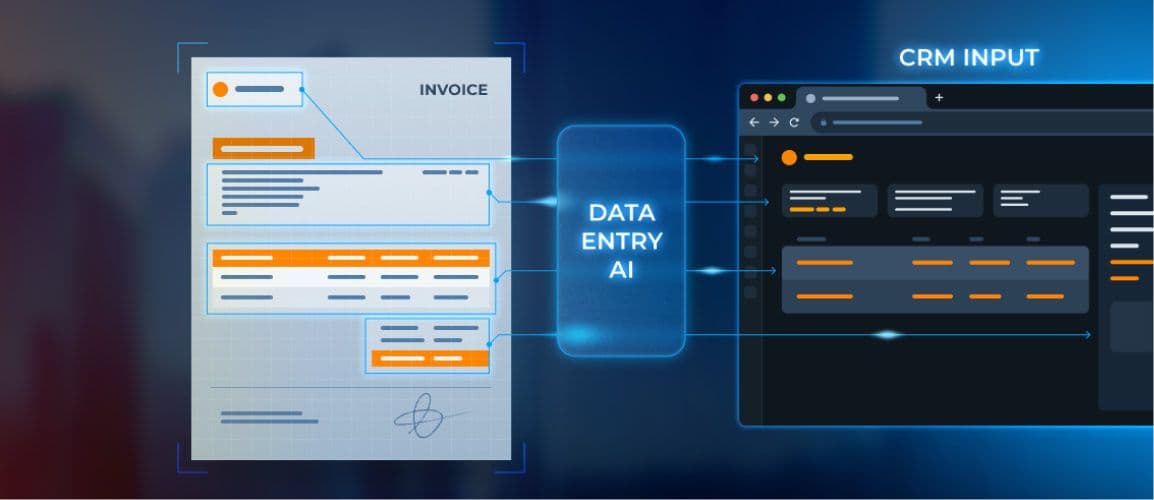
CRM cleanliness influences everything from forecasting to customer conversations. However, manual data entry is one of the most disliked tasks in sales. AI solves this by automating extraction, classification, and updating.
What the system handles
- Auto-capturing call notes
- Detecting sentiment and objections
- Extracting key deal details (budget, timeline, stakeholders)
- Structuring data consistently
- Updating CRM fields in real time
Example
With consent, an AI system listens to a sales call and summarises key notes such as timeline, budget, next steps, and objections, then automatically updates the CRM.
Outcome
No follow-up admin, no forgotten notes, and no missing data. Everyone across the organisation sees the same accurate information.
How to Implement This Workflow
1. Connect your CRM to an AI transcription tool
Tools like Gong, Fireflies, or HubSpot AI capture and analyse call recordings. Integrating them with your CRM ensures information flows automatically.
2. Train the AI with past call summaries
Feeding historical data into the system helps the AI recognise what constitutes useful information, such as budget mentions, objections, or decision timelines.
3. Set rules for structured fields
Define what pieces of information should populate specific CRM fields. For example, phrases relating to timing automatically update the “Decision Date” field.
4. Enable auto-updating capabilities
Allow the AI to update contact records and opportunities without manual intervention. You can enable approval steps for sensitive fields if needed.
5. Validate accuracy during early stages
Spend the first few weeks reviewing AI-generated summaries and updates. Make slight corrections to improve long-term consistency.
6. Standardise the workflow across teams
Once accurate, roll the system out broadly so that every salesperson benefits from consistent, quality CRM data.
4. Real-Time Lead Routing to the Right Team Member
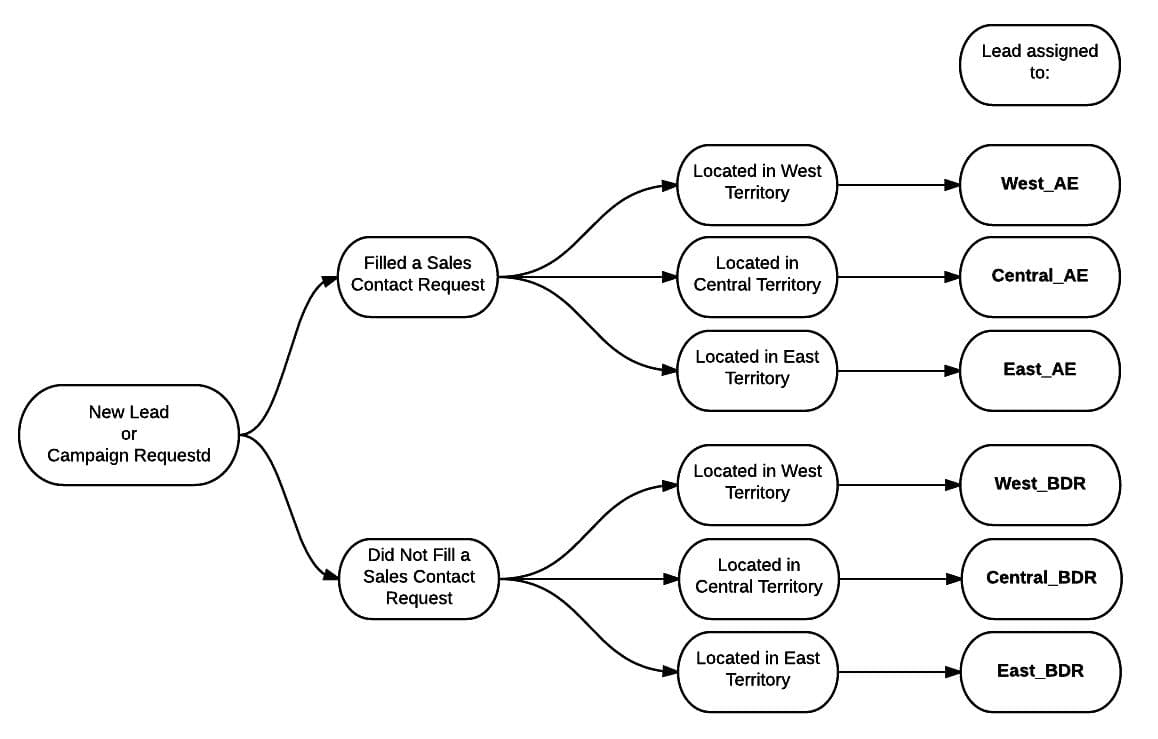
Speed matters, particularly when dealing with high-value prospects. AI can analyse incoming enquiries and instantly route them to the best-suited team member based on location, product expertise, deal size, or availability.
What AI considers in routing decisions
- Geographic region
- Industry vertical
- Product category
- Lead score
- Deal value
- Workload balancing among team members
Example
A high-intent prospect submits a consultation form at 9:15 a.m. AI identifies the message as urgent (due to keywords like “timeline”, “proposal”, or “budget”) and routes it to the team member with available capacity who specialises in that product line.
Impact
No lead sits in a shared inbox waiting to be picked up. Every qualified enquiry reaches the right person instantly.
How to Implement This Workflow
1. Define your routing rules
Start by listing the attributes that determine who should receive which leads. This could include region, deal size, product category, or skill set.
2. Use AI to analyse incoming messages
Implement a tool capable of reading and categorising incoming messages using natural language processing (NLP). This ensures the AI understands the lead’s intent.
3. Categorise enquiries by type
Group enquiries into categories like “sales”, “support”, “partnership”, or “urgent”. This helps the AI route messages intelligently.
4. Connect routing rules to your CRM inbox
Ensure the AI can apply these rules in real time by linking your CRM or shared inbox directly to the routing engine.
5. Test routing with low-priority messages
Start with general enquiries to ensure accuracy before routing enterprise-level leads automatically.
6. Improve accuracy through feedback loops
Have your team mark improperly routed leads, giving the AI more context to learn from.
5. Inbox Triage and Automated Response Handling
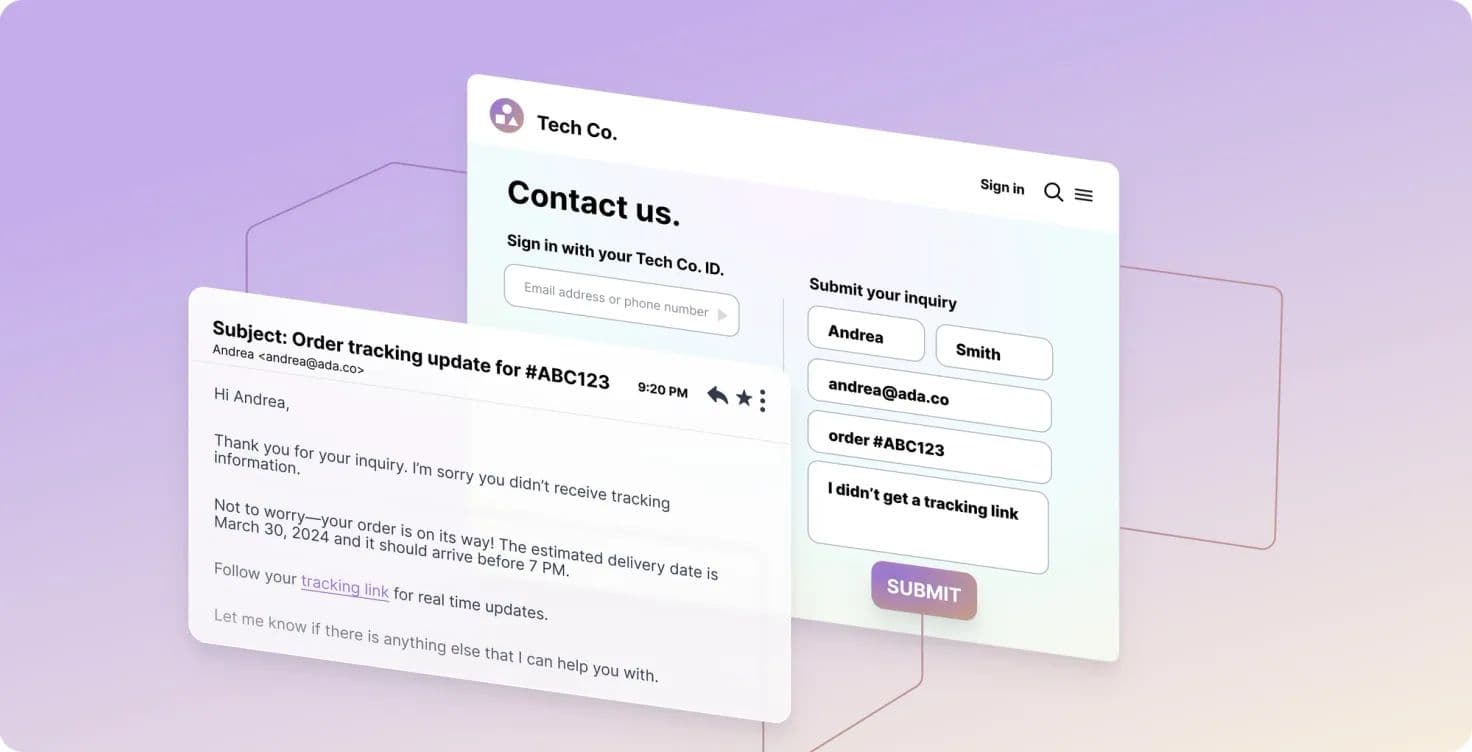
Sales inboxes fill up quickly, and not every message needs hands-on attention. AI can read, classify, and respond to routine enquiries, freeing your team to focus on conversations that truly require their expertise.
Capabilities of this workflow
- Categorises messages by intent (“pricing request”, “support”, “partnership”, etc.)
- Extracts and validates key information
- Drafts instant responses for common enquiries
- Flags urgent or high-value messages
- Filters out incomplete or irrelevant enquiries
Example
When someone writes, “Can you send me your updated product overview?”, AI identifies this as a standard request and automatically responds with the correct asset, while logging the interaction in the CRM.
Why it works
Your team no longer spends their mornings clearing routine requests.
How to Implement This Workflow
1. Identify your most frequent email types
Review your inbox and list out the types of enquiries that regularly appear. These usually include pricing questions, brochure requests, and basic product queries.
2. Create a set of reusable templates
Prepare reference templates that reflect your tone and style. AI uses these as a foundation for drafting responses.
3. Implement an AI email reader
Use tools such as Microsoft Copilot or a custom AI model to analyse the content, extract details, and classify each message accurately.
4. Set up clear triage rules
Define what should happen in each situation, for example, whether certain emails trigger automatic responses or require a human review.
5. Activate automation for low-risk messages
Start by automating replies to simple, repetitive requests to conserve time without compromising quality.
6. Review AI-generated emails periodically
Monitor tone and accuracy weekly to ensure the system stays aligned with your brand.
6. Proposal and Quote Generation
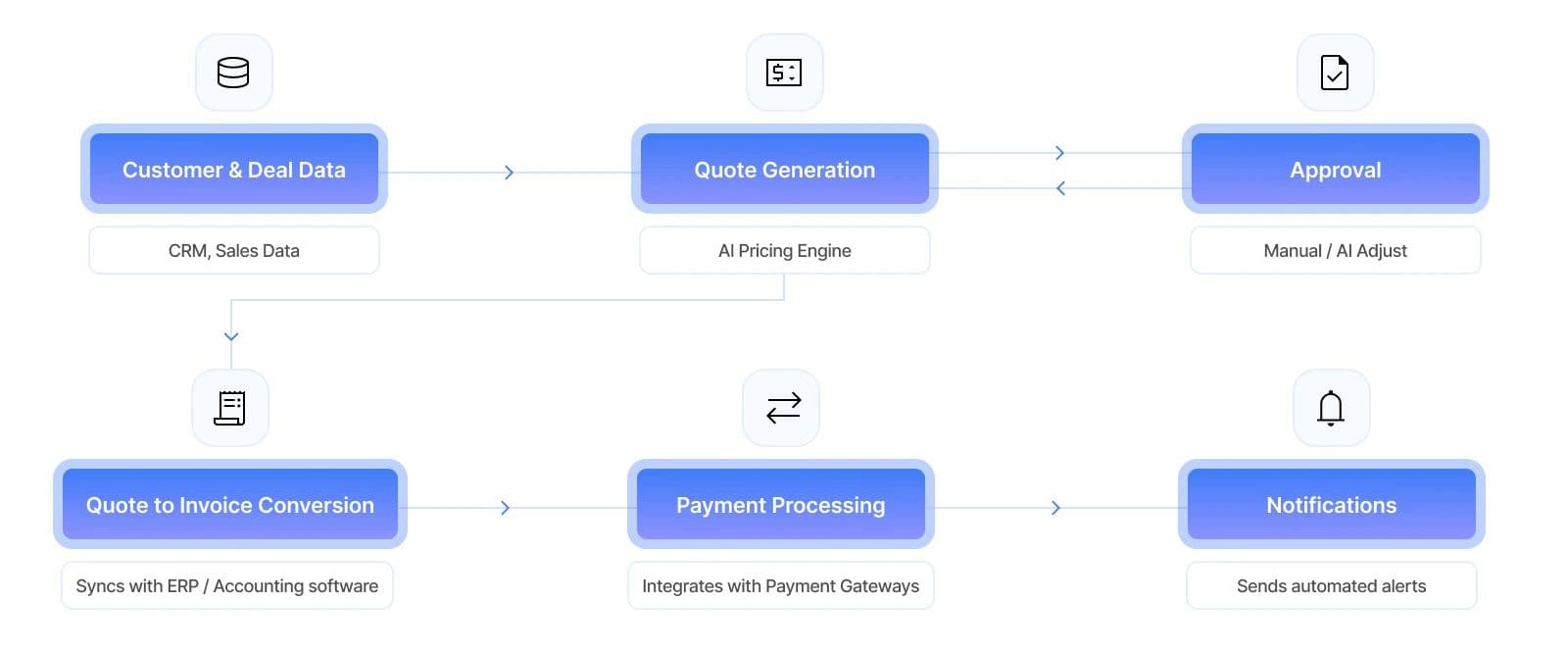
Creating proposals is important but can be time-consuming, especially when you’re working with detailed pricing or varied product bundles. AI automates this by generating polished drafts and estimates based on predefined rules.
What automated proposal workflows handle
- Auto-calculating pricing based on customer needs
- Pulling product descriptions from an up-to-date library
- Customising sections based on industry or use case
- Inserting timelines, deliverables, and integrations
- Creating branded, client-ready PDFs
Example
A salesperson enters just three details: lead name, required service tier, and contract length. AI generates a professionally formatted proposal with customised messaging and accurate numbers.
Outcome
Proposals go out faster, with fewer errors and less manual formatting.
How to Implement This Workflow
1. Build a modular proposal library
Prepare standard sections such as pricing tables, case studies, service descriptions, and contract terms. This gives AI the building blocks it needs.
2. Store the library within an AI-enabled proposal tool
Platforms like Qwilr, PandaDoc AI, or custom document generators can assemble these components automatically.
3. Define dynamic input fields
Clarify which pieces of information your sales team should manually input,
such as customer name, service tier, or contract length.
4. Establish validation rules
Ensure the AI cannot produce unapproved pricing or outdated content by setting required checks.
5. Allow reps to review drafts before sending
AI should assist, not replace human judgement. Salespeople can fine tune the proposal into a polished final version.
6. Analyse proposal performance over time
Track which templates convert best to help the AI refine future drafts and improve effectiveness.
7. Predictive Deal Forecasting and Risk Identification
Beyond efficiency, AI can also enhance strategic decision-making. By analysing communication patterns, deal timelines, and historical results, AI identifies risks earlier and forecasts likely outcomes.
What AI typically evaluates
- Engagement levels across touchpoints
- Communication frequency and sentiment
- Stage progression speed
- Missing decision-makers
- Comparison to behavioural patterns of past wins/losses
Example
If a prospect hasn’t replied within a typical engagement window or you’re missing a key decision-maker, the AI flags the deal and suggests next steps.
Benefit
Sales managers gain clearer visibility, enabling them to support their team before deals stall.
How to Implement This Workflow
1. Connect your CRM to an AI forecasting system
This allows the model to access all deal data in real time. HubSpot AI and Salesforce Einstein are strong options.
2. Import as much deal history as possible
The AI needs to analyse past wins and losses to understand buying patterns and predictable risk points.
3. Set up your risk indicators
Define which missing elements qualify as risks, for instance, no decision-maker identified or prolonged silence from the prospect.
4. Build dashboards that visualise deal health
Give managers a clear view of which deals are progressing smoothly and which require intervention.
5. Conduct regular risk review sessions
Every week, examine flagged opportunities. Often, early action makes the difference between saving and losing a deal.
6. Re-train the model quarterly
Sales cycles evolve, so updating the system with new data keeps it accurate and relevant.
8. Automated Upsell and Cross-Sell Recommendations
Customer relationships don’t end after the initial sale. AI can help nurture ongoing value by identifying when existing customers may benefit from upgrades or complementary services.
What AI evaluates
- Usage patterns
- Contract renewal dates
- Interaction with specific resources
- Support queries that indicate growing needs
- Historical purchasing behaviour

Example
If a customer repeatedly exceeds their usage limit, AI triggers a message offering a higher-tier plan that aligns with their current behaviour.
Why it matters
This is not a hard sell, it’s a helpful suggestion based on genuine need.
How to Implement This Workflow
1. Define your upsell and cross-sell triggers
Set parameters such as usage thresholds, product limitations, or renewal windows that indicate a customer might benefit from an upgrade.
2. Feed product and pricing data into the AI
This ensures the system understands every service you offer, along with associated costs and suitability.
3. Analyse successful past upgrades
Doing so allows the AI to discover patterns that lead to positive upgrade decisions.
4. Set up automatic alerts for sales reps
When the AI detects a potential upsell opportunity, your team receives a notification with a recommendation.
5. Allow AI to draft personalised upgrade messages
These drafts help reps send timely, contextually appropriate suggestions.
6. Monitor which recommendations convert
Regular performance reviews help refine the AI’s targeting accuracy.
Bringing It All Together
When used thoughtfully, AI sales automation doesn’t remove the human aspect of selling, it strengthens it. By eliminating repetitive work and ensuring information flows seamlessly, AI helps teams focus on strategic conversations and genuine relationship-building. Even adopting just a few of these workflows can make a noticeable difference in consistency, efficiency, and accuracy across your sales process.How Saigon Digital Supports AI-Driven Sales Workflows
At Saigon Digital, we view AI workflow automation as a way to create clarity and efficiency rather than complexity. Our AI Workflow service focuses on designing bespoke automation systems that integrate directly with your operations, from lead handling to CRM task routing and internal decision-making.A practical example is our AI Enquiry Checker, which reads and validates incoming messages, extracts key details, and routes only complete, high-quality enquiries to your team. It’s one of many ways we help organisations streamline communication, remove bottlenecks, and maintain reliable data without additional workload.If you’re exploring how to bring AI sales automation into your organisation, we’re committed to creating systems that feel intuitive, dependable, and genuinely useful in everyday operations.